Feb 19, 2026

Best 24 GB GPU for Local LLMs: The 3 Cards That Actually Matter

24 GB is the practical enthusiast tier for local LLMs. It gives you room for 32B and 35B class models, longer context, and serious experimentation without stepping into workstation pricing.

Best 24 GB GPU for Local LLMs: The 3 Cards That Actually Matter
A
Andre
GPUAILLMs

PC Part Guide is supported by its audience. We may earn commissions from qualifying purchases through affiliate links on this page. Full disclosure

1.0

Why This Guide Exists

24 GB is where local LLM builds start to feel flexible. It is enough for many high-quality 30B-class models, it gives 13B models room for context, and it lets you test larger models without immediately jumping to multi-GPU or workstation cards. Both Ollama and llama.cpp run well at this tier across NVIDIA and AMD.

The three consumer 24 GB choices are very different purchases: the RTX 4090 is the fastest and easiest software path, the RX 7900 XTX is the cleanest new-card value, and the RTX 3090 is the cheapest way into serious local inference. See our VRAM requirements guide to confirm which models fit at 24 GB.

2.0

Quick Comparison

These are the GPUs worth shortlisting for local LLM inference. The comparison weights VRAM first, then memory bandwidth, software support, power draw, and whether the card makes sense new or used.

GPUPositionVRAMBandwidthPowerBest ForBuy
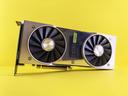
GeForce RTX 4090
GeForce RTX 4090
Best 24 GB Overall
Fastest 24 GB CUDA card24 GB GDDR6X1,008 GB/s450 WUsed-market 24 GB CUDA powerCheck
Radeon RX 7900 XTX
Radeon RX 7900 XTX
Best New 24 GB
New 24 GB with warranty24 GB GDDR6960 GB/s355 WBudget 24 GB, AMD ecosystemCheck
GeForce RTX 3090
GeForce RTX 3090
Best Cheap 24 GB
Lowest-cost 24 GB CUDA24 GB GDDR6X936 GB/s350 WBudget entry to 24 GB CUDACheck
3.0

Product Reviews

VRAM
24 GB GDDR6X
Bandwidth
1,008 GB/s
Architecture
Ada Lovelace
PSU
850 W recommended

A used RTX 4090 is arguably the smartest buy for local LLMs right now. You get 24 GB of GDDR6X at 1,008 GB/s bandwidth, full CUDA support, and Ada Lovelace features like FP8 and Flash Attention 2 - all at a significant discount from the new price. The 4090 was the top-tier GPU just one generation ago, and for inference workloads it is still exceptionally capable.

The 24 GB VRAM is the key advantage over a new RTX 5080. You can run Llama 3.1 70B at 4-bit quantization (roughly 38 GB) with partial CPU offloading, or run it entirely on GPU at 3-bit quantization. Models like Command R (35B), Qwen 2.5 32B, and Mixtral 8x7B fit entirely in VRAM. That flexibility is worth the used-market risk for many builders.

Bandwidth at 1,008 GB/s is actually higher than the RTX 5080's 960 GB/s, which means the 4090 generates tokens faster for models that fit in 24 GB. The extra bandwidth matters because inference on large models is memory-bound - the GPU spends most of its time moving weights from VRAM to the compute units.

The risks of buying used are real: no warranty, potential thermal paste degradation, and the small chance of a card that was run hard for crypto mining. Buy from sellers with good reputations, test the card under sustained load before committing, and verify all VRAM is error-free using GPU stress tests. At the right price, a used 4090 is the best value in local LLM hardware.

Why It Wins

  • -1,008 GB/s bandwidth - faster than the new RTX 5080
  • -24 GB VRAM opens up 70B-class models
  • -Full CUDA + FP8 + Flash Attention support
  • -Significant discount over buying new

Skip If

  • -No warranty on used cards
  • -450 W TDP needs a strong PSU and good cooling
  • -Risk of degraded hardware from mining or heavy use
VRAM
24 GB GDDR6
Bandwidth
960 GB/s
Architecture
RDNA 3
PSU
800 W recommended

The RX 7900 XTX is the cheapest way to get 24 GB of VRAM on a new GPU. At 960 GB/s memory bandwidth it matches the RTX 5080 on paper, and the extra 8 GB of VRAM opens up model sizes that 16 GB cards simply cannot run. If your budget does not stretch to a 5090 and you want to run larger models, this is the card to look at.

The catch is the AMD software ecosystem. ROCm support for local LLMs has improved significantly - llama.cpp, Ollama, and LM Studio all support AMD GPUs via HIP/ROCm. But support is still behind CUDA in maturity. Some quantization formats and optimization techniques arrive on NVIDIA first, and debugging GPU issues on AMD requires more community research.

Performance is competitive where ROCm is well-supported. For models that fit in 24 GB, token generation speeds are close to the RTX 4090 in many benchmarks. The 7900 XTX also has 24 GB of GDDR6 (not GDDR6X), which means slightly lower bandwidth than NVIDIA's 4090, but the difference is marginal in practice for LLM inference.

Power draw is 355 W with an 800 W PSU recommendation, which is manageable. The card runs warm but within spec, and most aftermarket coolers handle it well. If you are comfortable with ROCm's current state and want 24 GB at the lowest new-GPU price, the 7900 XTX is a strong value.

Why It Wins

  • -Cheapest new GPU with 24 GB VRAM
  • -960 GB/s bandwidth competitive with RTX 4090
  • -ROCm support is improving rapidly across major frameworks
  • -Good value for 70B models at aggressive quantization

Skip If

  • -ROCm ecosystem still lags behind CUDA in tooling and support
  • -Some quantization formats and optimizations arrive later
  • -GDDR6 is slightly slower than GDDR6X on bandwidth
VRAM
24 GB GDDR6X
Bandwidth
936 GB/s
Architecture
Ampere
PSU
750 W recommended

The RTX 3090 is the cheapest way to get 24 GB of VRAM with CUDA support. On the used market it costs a fraction of the 4090 while offering the same VRAM capacity. For builders who want to run larger models and cannot justify the cost of a new GPU, the 3090 is the entry ticket to 24 GB inference.

At 936 GB/s bandwidth it is slightly slower than the 4090 and 7900 XTX, but the difference in token generation speed is modest - typically 10-15% slower for the same model. You still get CUDA, you still get 24 GB, and the Ampere architecture supports Flash Attention and most quantization formats through llama.cpp and ExLlamaV2.

The main compromises are generational. Ampere lacks FP8 support (that is an Ada Lovelace and Blackwell feature), so you lose one potential speedup for quantized inference. The 3090 also draws 350 W and runs warm, especially on reference coolers. An aftermarket model with a good cooler is worth the small price premium on the used market.

If you are experimenting with local LLMs and want to see what 24 GB VRAM unlocks without spending GPU-launch money, the used 3090 is the lowest-risk option. It handles everything from 7B to 35B models on GPU, and even 70B models with partial offloading. Just make sure the card you buy has been tested and has clean VRAM.

Why It Wins

  • -Cheapest 24 GB VRAM card with CUDA support
  • -Runs all major inference frameworks without issue
  • -Good enough bandwidth for comfortable inference speeds
  • -Ampere architecture still well-supported

Skip If

  • -No FP8 support - misses a quantization speedup
  • -Ampere is two generations behind Blackwell
  • -Runs warm; needs good case cooling
  • -Used market risks: no warranty, potential wear
4.0

Fast Answer

  • -Best 24 GB overall: RTX 4090 - fastest 24 GB consumer card and the easiest CUDA path.
  • -Best new 24 GB card: RX 7900 XTX - strong value if you want warranty coverage and can work with ROCm.
  • -Best budget 24 GB card: Used RTX 3090 - cheapest serious CUDA option for larger local models.
  • -Skip 24 GB if 70B Q4 is your everyday workload.
5.0

Choose by VRAM

RTX 4070 Ti Super

16 GB - Below This Tier

Good for 7B and 13B models, but it starts to feel cramped once you want 30B-class models, long context, or multiple tools running at once.

RTX 4090

24 GB - The Sweet Spot

The practical enthusiast tier. It handles 13B models comfortably, makes 30B-35B models realistic, and gives you enough room to experiment with larger quantized models.

RTX 5090

32 GB - Step Up

Worth it when 70B-class models are not occasional experiments. The extra 8 GB reduces offload, improves context headroom, and makes the system feel less constrained.

6.0

Choose by Software Ecosystem

RTX 4090

NVIDIA 24 GB

The RTX 4090 and RTX 3090 are the safer local LLM choices because CUDA gets the widest framework support.

RX 7900 XTX

AMD 24 GB

The RX 7900 XTX gives you 24 GB new for less money, but ROCm still asks more from the user when an edge case appears.

7.0

Choose by Power and Thermals

GPUTDPRecommended PSUNotes
RTX 4090450 W850 WFastest 24 GB option; use a quality 12VHPWR cable
RX 7900 XTX355 W800 WNew-card value, but case airflow still matters
RTX 3090350 W750 WRuns hot on many used models; test memory and cooling
8.0

How to Choose the Right 24 GB GPU for Local LLMs

1. Decide whether CUDA is mandatory. If you want the least friction across inference frameworks, choose the RTX 4090 or RTX 3090.

2. Decide whether warranty matters more than peak performance. The RX 7900 XTX is compelling because it is a new 24 GB card at a lower price.

3. Do not confuse 24 GB with unlimited VRAM. It is excellent for 13B to 35B models and useful for larger experiments, but not the cleanest answer for daily 70B Q4 work.

Use our VRAM Calculator to check exact memory requirements for your model and quantization before buying.

9.0

Narrow Down by Budget or Brand

10.0

Compare GPUs Head-to-Head

11.0

What 24 GB Lets You Run

Model ClassTypical Quantization24 GB ResultNotes
7B-13BQ4 to FP16ExcellentPlenty of room for context and batching
Mixtral 8x7BQ4Fits wellOne of the best practical 24 GB workloads
Qwen 32B / Command R 35BQ4ComfortableThis is the real 24 GB sweet spot
Llama 70BQ3 to Q4Offload neededUsable for testing, not the cleanest tier
12.0

The 24 GB Buying Rule

  • -Choose RTX 4090 if you want the fastest 24 GB card and the least software friction.
  • -Choose RX 7900 XTX if you want a new 24 GB card with warranty and can live with ROCm trade-offs.
  • -Choose RTX 3090 if budget matters most and you are comfortable testing used hardware.
13.0

Final Thoughts

The best 24 GB GPU for local LLMs is the RTX 4090 if you want maximum speed and the most reliable software path. The RX 7900 XTX is the value pick when you want a new 24 GB card, and the RTX 3090 remains the budget answer.

FAQ

Frequently Asked Questions

Is 24 GB enough for Llama 70B?
Not cleanly at Q4 on one consumer GPU. 24 GB is best for 7B through 35B models and serious experimentation.
Should I buy a used RTX 4090 or new RX 7900 XTX?
Choose the RTX 4090 if CUDA compatibility and highest bandwidth matter most. Choose the RX 7900 XTX if you want a new 24 GB card with warranty and are comfortable with ROCm.
Is the RTX 3090 still viable in 2026?
Yes for inference. It lacks newer features and runs warm, but it is still the cheapest practical 24 GB CUDA card.

End of Document

Reader Discussion

Be the first to add a note to this article.

Please log in to join the discussion.

No comments yet.

Back to all articles
Share this article