Apr 2, 2026

Best AMD GPU for Local LLMs: The 3 Cards Worth Buying (And Why Most Aren't)

Running local LLMs on AMD is no longer experimental — it works. But most AMD GPUs are still the wrong choice. Here is exactly which cards deliver, which models fit, and when AMD beats NVIDIA on price.

Best AMD GPU for Local LLMs: The 3 Cards Worth Buying (And Why Most Aren't)
A
Andre
GPUAILLMs

PC Part Guide is supported by its audience. We may earn commissions from qualifying purchases through affiliate links on this page. Full disclosure

1.0

Why AMD for Local LLMs

For years, the advice was simple: buy NVIDIA for local LLMs. CUDA was the only game in town, and AMD GPUs were a compatibility gamble. That changed. ROCm has matured, Ollama and llama.cpp support AMD GPUs out of the box on Linux, and AMD's VRAM-per-dollar advantage has grown to the point where ignoring AMD means leaving money on the table.

The math is straightforward. The RX 7900 XTX gives you 24 GB of VRAM for $899 new with a full warranty. The cheapest new NVIDIA card with 24 GB is the RTX 4090 at $1,599 — nearly double. If you can live within ROCm's current limitations, AMD lets you run larger models for less money.

But this only works if you pick the right AMD card. Most of AMD's lineup is built for gaming, not AI workloads. VRAM capacity and memory bandwidth are the only specs that matter for LLM inference. Gaming FPS and ray tracing cores do nothing for your token generation speed. This guide ranks the AMD GPUs by VRAM first, bandwidth second, and software readiness third.

2.0

Quick Comparison

These are the GPUs worth shortlisting for local LLM inference. The comparison weights VRAM first, then memory bandwidth, software support, power draw, and whether the card makes sense new or used.

GPUPositionVRAMBandwidthPowerBest ForBuy
Radeon RX 7900 XTX
Radeon RX 7900 XTX
Best Overall AMD
24 GB VRAM - best AMD experience24 GB GDDR6960 GB/s355 WBudget 24 GB, AMD ecosystemCheck
Radeon RX 9070 XT
Radeon RX 9070 XT
Best Mid-Range AMD
16 GB RDNA 4 - current-gen value16 GB GDDR6640 GB/s304 WNew mid-range 16 GB AMDCheck
Radeon RX 7800 XT
Radeon RX 7800 XT
Best Budget AMD
16 GB - cheapest viable AMD entry16 GB GDDR6624 GB/s263 WBudget 16 GB AMD entryCheck
3.0

Product Reviews

VRAM
24 GB GDDR6
Bandwidth
960 GB/s
Architecture
RDNA 3
PSU
800 W recommended

The RX 7900 XTX is the cheapest way to get 24 GB of VRAM on a new GPU. At 960 GB/s memory bandwidth it matches the RTX 5080 on paper, and the extra 8 GB of VRAM opens up model sizes that 16 GB cards simply cannot run. If your budget does not stretch to a 5090 and you want to run larger models, this is the card to look at.

The catch is the AMD software ecosystem. ROCm support for local LLMs has improved significantly - llama.cpp, Ollama, and LM Studio all support AMD GPUs via HIP/ROCm. But support is still behind CUDA in maturity. Some quantization formats and optimization techniques arrive on NVIDIA first, and debugging GPU issues on AMD requires more community research.

Performance is competitive where ROCm is well-supported. For models that fit in 24 GB, token generation speeds are close to the RTX 4090 in many benchmarks. The 7900 XTX also has 24 GB of GDDR6 (not GDDR6X), which means slightly lower bandwidth than NVIDIA's 4090, but the difference is marginal in practice for LLM inference.

Power draw is 355 W with an 800 W PSU recommendation, which is manageable. The card runs warm but within spec, and most aftermarket coolers handle it well. If you are comfortable with ROCm's current state and want 24 GB at the lowest new-GPU price, the 7900 XTX is a strong value.

Why It Wins

  • -Cheapest new GPU with 24 GB VRAM
  • -960 GB/s bandwidth competitive with RTX 4090
  • -ROCm support is improving rapidly across major frameworks
  • -Good value for 70B models at aggressive quantization

Skip If

  • -ROCm ecosystem still lags behind CUDA in tooling and support
  • -Some quantization formats and optimizations arrive later
  • -GDDR6 is slightly slower than GDDR6X on bandwidth
VRAM
16 GB GDDR6
Bandwidth
640 GB/s
Architecture
RDNA 4
PSU
750 W recommended

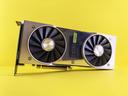
The RX 9070 XT is AMD's best value RDNA 4 card for local LLMs. At 16 GB GDDR6 with 640 GB/s bandwidth, it handles 7B models at full precision and 13B models at 4-bit quantization without breaking a sweat. For builders who want current-generation architecture at a reasonable price, this is the AMD sweet spot.

RDNA 4 brings improved AI compute throughput over RDNA 3, which matters for prompt processing speeds even if token generation remains memory-bandwidth bound. The 9070 XT also benefits from AMD's continued investment in ROCm, with better day-one support than previous generations.

The 16 GB limit is the same ceiling as competitors in this price range. You will not run 70B models entirely on GPU, but that is not what this card is for. It is purpose-built for the 7B-13B model range where most local LLM experimentation happens.

Power efficiency at 304 W with a 750 W PSU recommendation makes this an easy drop-in upgrade for most existing builds. No case rework, no PSU swap needed for the majority of builders.

Why It Wins

  • -Best RDNA 4 value for 7B-13B model inference
  • -Improved AI throughput over RDNA 3
  • -Reasonable 304 W TDP
  • -Current-gen architecture with improving ROCm support

Skip If

  • -16 GB VRAM limits model size ceiling
  • -ROCm support still maturing vs CUDA
  • -Cannot run 70B-class models without offloading
VRAM
16 GB GDDR6
Bandwidth
624 GB/s
Architecture
RDNA 3
PSU
650 W recommended

The RX 7800 XT is the cheapest 16 GB AMD GPU that still makes sense for local LLMs. At 624 GB/s memory bandwidth, it is the slowest card in the AMD lineup for inference, but the 16 GB capacity means you can still load and run the models that matter for experimentation: Llama 3.1 8B, Mistral 7B, Phi-3 medium, and Qwen 2.5 7B.

Where the 7800 XT shines is in value. On a strict budget, 16 GB of VRAM with ROCm support at this price point opens up local LLM experimentation to builders who cannot justify spending $600+ on a GPU. It runs llama.cpp and Ollama well, and for smaller models the inference speed is perfectly usable.

The tradeoff is bandwidth. At 624 GB/s, token generation is noticeably slower than the 9070 XT (640 GB/s) or 7900 XTX (960 GB/s). For interactive chat with a 7B model, the difference is marginal. For batch processing or long context windows, the slower bandwidth becomes more apparent.

Power draw is the lowest in the AMD lineup at 263 W with a 650 W PSU recommendation. This card will run in almost any system without a PSU upgrade, making it the easiest AMD GPU to add to an existing build for local LLM use.

Why It Wins

  • -Cheapest 16 GB AMD GPU for local LLMs
  • -Low 263 W power draw
  • -Runs 7B-13B models at acceptable speeds
  • -Easy drop-in upgrade for most builds

Skip If

  • -Slowest bandwidth in the AMD comparison at 624 GB/s
  • -RDNA 3 architecture - older than RDNA 4
  • -16 GB ceiling same as higher-priced cards
  • -Noticeably slower token generation than RX 9070 XT or 7900 XTX
4.0

Fast Answer

  • -Best overall AMD: RX 7900 XTX — 24 GB VRAM, 960 GB/s, strongest ROCm support in the consumer lineup.
  • -Best mid-range AMD: RX 9070 XT — 16 GB RDNA 4, improved AI throughput, current-gen value.
  • -Best budget AMD: RX 7800 XT — 16 GB at the lowest price, adequate for 7B-13B models.
5.0

Choose by VRAM Tier

RX 7800 XT

16 GB — Budget Entry

Runs 7B models at full precision and 13B models at 4-bit. The cheapest AMD GPU that still makes sense for local LLMs. Good for experimentation and learning.

RX 7900 XTX

24 GB — Enthusiast

The AMD sweet spot. Runs 70B models with partial GPU offloading and handles everything up to 35B comfortably on GPU. Best AMD value proposition.

RX 9070 XT

16 GB — Current Gen

RDNA 4 architecture with improved AI compute. Handles 7B-13B models easily. Best choice if you want the latest AMD architecture without stepping up to 24 GB pricing.

6.0

ROCm vs CUDA: The Real Differences in 2026

FeatureAMD (ROCm)NVIDIA (CUDA)Verdict
llama.cppFull supportFull supportTie
OllamaFull support (Linux)Full supportNVIDIA on Windows
vLLMROCm backend availablePrimary targetNVIDIA
PyTorchOfficial ROCm buildsNativeMinor NVIDIA edge
Flash AttentionSupported on RDNA 3+NativeTie on latest HW
FP8 inferenceRDNA 4 onlyAda + BlackwellNVIDIA
Community troubleshootingSmaller communityLargest communityNVIDIA

For most local LLM users running standard quantized models on llama.cpp or Ollama, the practical differences are smaller than the online discourse suggests. The main friction points are Windows support (weaker on AMD) and access to the very latest quantization formats.

7.0

Power and Thermal Comparison

GPUTDPRecommended PSUNotes
RX 7900 XTX355 W800 WRuns warm; aftermarket coolers recommended
RX 9070 XT304 W750 WGood efficiency for 16 GB class
RX 7800 XT263 W650 WLowest power draw, easiest drop-in

All three AMD cards are more power-efficient than their NVIDIA equivalents. The RX 7900 XTX draws 355 W compared to the RTX 4090\'s 450 W for the same 24 GB capacity. The RX 7800 XT at 263 W is the most power-efficient 16 GB card in this comparison.

8.0

How to Choose the Right AMD GPU

1. Start with the VRAM you need. 16 GB handles 7B-13B models. 24 GB opens up 30B-35B models and partial 70B offloading. Buy the most VRAM your budget allows — you cannot add more later.

2. Match your OS. If you run Linux, AMD ROCm works well with llama.cpp and Ollama. If you must use Windows, NVIDIA still offers a smoother experience.

3. Check your PSU. AMD cards are relatively efficient. The RX 7800 XT needs only 650 W. Even the 7900 XTX at 355 W TDP fits within a standard 800 W PSU.

4. Factor in software maturity. ROCm has improved dramatically but is not CUDA. If you rely on bleeding-edge quantization kernels or custom CUDA code, NVIDIA is still the safer bet.

Compare all GPUs in our GPU parts database, use the comparison tool, or check exact memory requirements with our VRAM Calculator.

9.0

Narrow Down by Brand or Budget

10.0

Final Thoughts

The AMD GPU lineup for local LLMs in 2026 is the strongest it has ever been. The RX 7900 XTX is the best value new 24 GB card on the market, full stop — NVIDIA has no answer at this price point. The RX 9070 XT brings RDNA 4 efficiency to the 16 GB tier with improved AI throughput. And the RX 7800 XT proves that you can run local LLMs on a $500 GPU without compromise.

AMD's weakness remains software maturity, not hardware capability. If you are willing to run Linux and stay within the llama.cpp/Ollama ecosystem, AMD GPUs deliver competitive inference speeds at dramatically lower prices. The gap narrows with every ROCm release.

FAQ

Frequently Asked Questions

Is ROCm ready for local LLM inference on AMD GPUs?
Yes, with caveats. llama.cpp and Ollama support AMD GPUs via ROCm on Linux, and support improves with each release. PyTorch has official ROCm builds. The gaps: some CUDA-only quantization kernels are not available, Windows support is less mature, and new inference techniques usually arrive on CUDA first. For standard 4-bit inference on established model architectures, ROCm works well.
How does AMD VRAM-per-dollar compare to NVIDIA?
AMD wins decisively on new-GPU VRAM-per-dollar. The RX 7900 XTX delivers 24 GB for $899 ($37/GB), while NVIDIA's cheapest new 24 GB card is the RTX 4090 at $1,599 ($67/GB). AMD gives you roughly 45% more VRAM per dollar at the high end. The tradeoff is the software ecosystem — CUDA is more polished and universal.
Can I run Llama 3.1 70B on an AMD GPU?
Partially. The RX 7900 XTX has 24 GB. Llama 3.1 70B at Q4 needs ~38 GB. You can run it with 24 GB on GPU + 14 GB offloaded to system RAM via llama.cpp's GPU/CPU split. Performance drops significantly for the offloaded layers (3-5x slower). For comfortable 70B inference, you need a 48 GB card or multi-GPU setup.
Which AMD GPU should I buy for 7B-13B models?
The RX 7800 XT is the cheapest viable option with 16 GB. The RX 9070 XT offers the best price-to-performance with RDNA 4. If you plan to experiment with larger models later, stretch to the RX 7900 XTX for 24 GB — the extra VRAM headroom is worth the premium.
Do AMD GPUs work with Ollama on Windows?
Ollama's Windows support for AMD GPUs exists but is less mature than Linux. HIP SDK on Windows has known limitations. For the smoothest AMD experience, use Linux (Ubuntu 22.04+ recommended) with ROCm installed. If you must use Windows, NVIDIA GPUs are still the lower-friction choice.

End of Document

Reader Discussion

Be the first to add a note to this article.

Please log in to join the discussion.

No comments yet.

Back to all articles
Share this article