Feb 26, 2026

Best Budget GPU for Local LLMs: Spend Less, Buy the Right VRAM Tier

Budget GPU advice for local LLMs is backwards if it starts with gaming performance. The useful question is simple: what is the cheapest card that can hold the models you actually want to run? This guide ranks the budget picks by VRAM, bandwidth, warranty risk, and software comfort.

Best Budget GPU for Local LLMs: Spend Less, Buy the Right VRAM Tier
A
Andre
GPUAILLMs

PC Part Guide is supported by its audience. We may earn commissions from qualifying purchases through affiliate links on this page. Full disclosure

1.0

Why This Guide Exists

Most budget GPU lists push newer midrange cards because they look sensible for gaming. Local LLMs punish that logic. A new GPU with 12 GB can be a worse LLM card than an older used flagship with 24 GB. On Ollama and llama.cpp, VRAM capacity is the first and hardest filter — everything else is secondary.

The budget rule is: buy the most VRAM you can tolerate from a risk, power, and noise perspective. Bandwidth comes next. CUDA or ROCm support matters after that. Warranty matters, but it should not trick you into buying too little VRAM for your workload. Check our VRAM requirements guide before setting a budget — knowing which model tier you need changes what "budget" means. Then use our VRAM Calculator to verify your exact model and quantization fit.

2.0

Quick Comparison

These are the GPUs worth shortlisting for local LLM inference. The comparison weights VRAM first, then memory bandwidth, software support, power draw, and whether the card makes sense new or used.

GPUPositionVRAMBandwidthPowerBest ForBuy
GeForce RTX 3090
GeForce RTX 3090
Best Budget Overall
24 GB used CUDA value24 GB GDDR6X936 GB/s350 WBudget entry to 24 GB CUDACheck
GeForce RTX 4070 Ti Super
Best New Budget
16 GB new-card safety16 GB GDDR6X672 GB/s285 WBudget new-build for 7B-13B modelsCheck
GeForce RTX 5080
GeForce RTX 5080
Best Stretch Pick
Fastest 16 GB budget ceiling16 GB GDDR7960 GB/s360 W7B-13B models at full speedCheck
3.0

Product Reviews

VRAM
24 GB GDDR6X
Bandwidth
936 GB/s
Architecture
Ampere
PSU
750 W recommended

The RTX 3090 is the cheapest way to get 24 GB of VRAM with CUDA support. On the used market it costs a fraction of the 4090 while offering the same VRAM capacity. For builders who want to run larger models and cannot justify the cost of a new GPU, the 3090 is the entry ticket to 24 GB inference.

At 936 GB/s bandwidth it is slightly slower than the 4090 and 7900 XTX, but the difference in token generation speed is modest - typically 10-15% slower for the same model. You still get CUDA, you still get 24 GB, and the Ampere architecture supports Flash Attention and most quantization formats through llama.cpp and ExLlamaV2.

The main compromises are generational. Ampere lacks FP8 support (that is an Ada Lovelace and Blackwell feature), so you lose one potential speedup for quantized inference. The 3090 also draws 350 W and runs warm, especially on reference coolers. An aftermarket model with a good cooler is worth the small price premium on the used market.

If you are experimenting with local LLMs and want to see what 24 GB VRAM unlocks without spending GPU-launch money, the used 3090 is the lowest-risk option. It handles everything from 7B to 35B models on GPU, and even 70B models with partial offloading. Just make sure the card you buy has been tested and has clean VRAM.

Why It Wins

  • -Cheapest 24 GB VRAM card with CUDA support
  • -Runs all major inference frameworks without issue
  • -Good enough bandwidth for comfortable inference speeds
  • -Ampere architecture still well-supported

Skip If

  • -No FP8 support - misses a quantization speedup
  • -Ampere is two generations behind Blackwell
  • -Runs warm; needs good case cooling
  • -Used market risks: no warranty, potential wear
VRAM
16 GB GDDR6X
Bandwidth
672 GB/s
Architecture
Ada Lovelace
PSU
700 W recommended

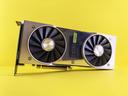
The RTX 4070 Ti Super is the cheapest new NVIDIA GPU that makes sense for local LLMs. At 16 GB GDDR6X with 672 GB/s bandwidth, it targets the same model range as the RTX 5080 (7B-13B models) but at a significantly lower price. If you are building a new system for local LLMs and your budget does not stretch to $999, this is where you land.

The 4070 Ti Super gets you into the Ada Lovelace generation with FP8 support, DLSS 3, and good power efficiency at 285 W. For inference specifically, FP8 is the feature that matters - it allows certain quantized models to run faster than they would on Ampere cards like the 3090, even though the 3090 has more VRAM.

Bandwidth is the limitation. At 672 GB/s it is noticeably slower than the 5080 (960 GB/s) or 4090 (1,008 GB/s). Token generation speeds for the same model will be lower. For smaller models (7B) this difference is less noticeable, but for 13B models the slower bandwidth becomes more apparent.

This card makes the most sense for someone building a new workstation who wants CUDA support, does not need to run 70B models, and wants to keep the total GPU cost reasonable. Pair it with 32 GB of system RAM and you can even offload larger models, albeit at reduced speed.

Why It Wins

  • -Cheapest new NVIDIA GPU that is viable for local LLMs
  • -FP8 support from Ada Lovelace generation
  • -Low 285 W power draw - easy on PSUs and cooling
  • -Great for 7B-13B models at comfortable speeds

Skip If

  • -Only 16 GB VRAM - cannot run models above ~14B fully on GPU
  • -672 GB/s bandwidth is slowest in this comparison
  • -Not competitive with used 24 GB cards for large models
VRAM
16 GB GDDR7
Bandwidth
960 GB/s
Architecture
Blackwell
PSU
850 W recommended

The RTX 5080 hits the price-performance sweet spot for local LLMs. At 16 GB GDDR7 with 960 GB/s bandwidth, it runs 7B models at or near their full potential and handles 13B models at 4-bit quantization comfortably. If your workflow centers on Llama 3.1 8B, Mistral 7B, or Phi-3 medium, this card delivers without the premium tax of the 5090.

GDDR7 memory is the key upgrade over the previous generation. The bandwidth is competitive with the RTX 4090 despite having less total VRAM, which means token generation speeds for models that fit in 16 GB are very fast. You are not sacrificing speed - you are sacrificing capacity.

Power draw is reasonable at 360 W with an 850 W PSU recommendation. That is within the comfort zone of most modern PSUs and cases, unlike the 5090 which needs a significant power infrastructure upgrade for many builders.

The limitation is 16 GB of VRAM. Models like Llama 3.1 70B at 4-bit quantization need roughly 38 GB, which does not fit. You can still run it with offloading to system RAM, but inference speed drops significantly. If your goal is running the largest models locally, step up to the 5090 or consider a used 24 GB card.

Why It Wins

  • -Best price-to-performance for 7B-13B model inference
  • -GDDR7 bandwidth competitive with much more expensive cards
  • -Reasonable 360 W power draw - no PSU upgrade needed for most
  • -Full CUDA and Blackwell feature set

Skip If

  • -16 GB VRAM limits you to models under ~14B at full precision
  • -Cannot run 70B-class models without CPU offloading
  • -Less future-proof than 24 GB or 32 GB alternatives
4.0

Fast Answer

  • -Best budget overall: used RTX 3090 - 24 GB CUDA for the least money.
  • -Best new-card budget pick: RTX 4070 Ti Super - 16 GB, warranty, low power, and good CUDA support.
  • -Best stretch pick: RTX 5080 - faster 16 GB inference, but less flexible than a used 24 GB card.
  • -Do not buy an 8 GB GPU for local LLMs unless you only plan to test tiny models.
5.0

Choose by VRAM Tier

RTX 3060 12 GB

12 GB - absolute floor

RTX 3060 12 GB

The cheapest useful entry point. Fine for 7B models and some 13B models at Q4, but it becomes cramped quickly.

RTX 3090

24 GB - budget sweet spot

RTX 3090

The used-market answer for serious local inference. It fits far more model tiers than 12 GB or 16 GB cards and keeps CUDA compatibility.

RTX 5080

16 GB - new-card ceiling

RTX 5080

Fast and modern, but capacity-limited. Buy it when warranty and lower hardware risk matter more than running 30B-35B models cleanly.

6.0

Budget Tiers

BudgetBest Practical PickVRAMWhat It Runs Well
$150-$300Used RTX 3060 12 GB12 GB7B models, some 13B at Q4
$300-$500Used RTX 309024 GB7B-35B models, 70B with offload
$500-$800RTX 4070 Ti Super or RX 7900 XTX deal16-24 GBDepends on new vs used pricing
$800-$1,000RTX 508016 GB GDDR7Fast 7B-13B inference with warranty

The important jump is not from $300 to $500 in gaming performance. It is from 12 GB to 24 GB of usable GPU memory. That gap changes which models can stay fully on GPU, which is why an older RTX 3090 can make more sense than a newer midrange card.

7.0

New vs Used: The Real Tradeoff

Buy used if

  • -You want the most VRAM per dollar.
  • -You are comfortable testing the card immediately.
  • -You need CUDA and 24 GB without RTX 4090 pricing.
  • -Your case and PSU can handle a 350 W class GPU.

Buy new if

  • -Warranty and return policy matter more than model size.
  • -You only run 7B-13B models.
  • -You want lower power draw and less hardware risk.
  • -You are building a quiet daily workstation.

Used cards win the budget math because local LLMs are usually constrained by VRAM capacity, not gaming features. New cards win when downtime, noise, thermals, and seller risk are bigger concerns than fitting larger models.

8.0

What To Avoid

  • -Avoid 8 GB cards for local LLMs unless you only test tiny models.
  • -Avoid paying new-card money for 12 GB if a clean used 24 GB card is available.
  • -Avoid blower-style used cards unless your case airflow is built for them.
  • -Avoid used listings without return windows, serial photos, or stress-test proof.
9.0

Narrow Down by Budget

10.0

Final Thoughts

The best budget GPU for local LLMs is the card that fits your target model without forcing constant CPU offload. For most builders, that means chasing VRAM before gaming FPS. A used RTX 3090 is still the cleanest budget answer when you can accept used-card risk.

If you want new hardware, the RTX 4070 Ti Super is the sensible floor and the RTX 5080 is the stretch pick. Just be honest about the 16 GB ceiling. Before buying, use the VRAM Calculator to confirm your exact model, quantization, and context length.

FAQ

Frequently Asked Questions

What is the absolute cheapest GPU for local LLMs?
A used RTX 3060 12 GB is the lowest useful floor, but the RTX 3090 is the first budget card that feels genuinely flexible because it gives you 24 GB of CUDA VRAM.
Is the RTX 3090 worth it for budget LLM use?
Yes. A clean used RTX 3090 gives you 24 GB VRAM at a price where new cards usually offer 12-16 GB. For local inference, that extra VRAM matters more than newer gaming features.
Can I use a 16 GB GPU for local LLMs?
Yes. 16 GB is good for 7B and 13B models, plus some larger models at aggressive quantization. It is not ideal for 32B-35B models or 70B experiments.
Should I buy new or used for budget LLM builds?
Used is usually better for local LLMs because VRAM-per-dollar is the constraint. New makes sense when warranty, power draw, and lower hardware risk are more important than model size.

End of Document

Reader Discussion

Be the first to add a note to this article.

Please log in to join the discussion.

No comments yet.

Back to all articles
Share this article